
A Dynavo product · Early access
Better Message Trace Months of message trace for Exchange Online, in your own database.
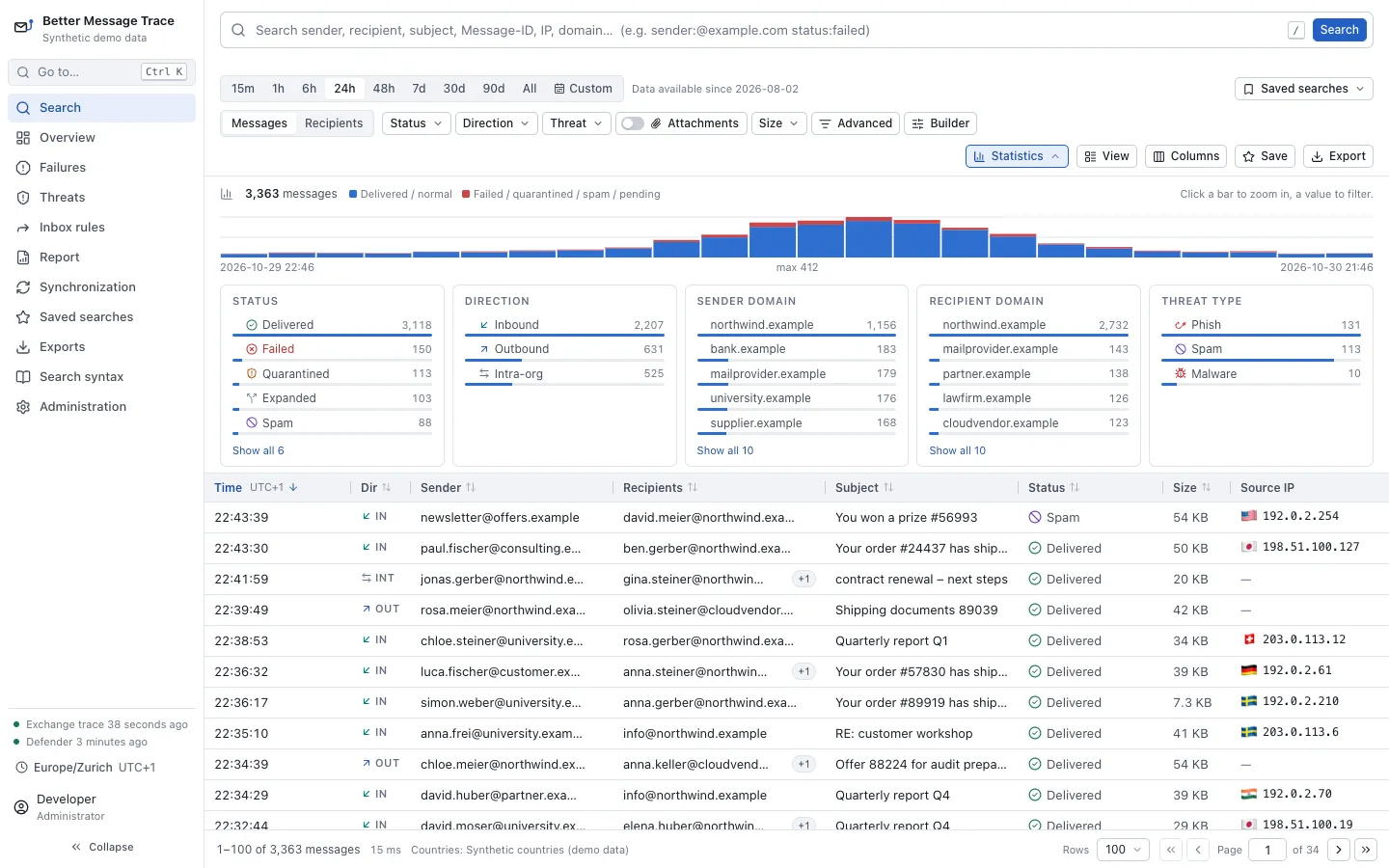
Better Message Trace continuously copies Exchange Online’s message trace into a PostgreSQL database of your own. Administrators search it without waiting for Microsoft, follow each message through Exchange, and see what Defender did with it, for as long as you keep the data: 180 days by default, where Microsoft keeps 90.
- For Exchange Online
- Metadata only, no mailbox content
- Self-hosted or run by us
Why
The questions mail administrators answer every day.
Message trace in the Exchange admin center can answer them, but each search waits for Microsoft, and its history ends after 90 days.
Better Message Trace keeps its own copy. It reads Microsoft’s APIs only in the background, so a search never waits for Microsoft and never uses up Microsoft’s request limits.
- Did it arrive?
- Who got it?
- Why did it bounce?
- Where did Defender put it?
What it does
Look up a message, and keep watch over all of them.
Investigate
Months of history
Keeps message trace for 180 days by default, or as long as you set. Microsoft’s message trace reaches back 90 days; what Better Message Trace has stored stays searchable after that.
Search that keeps up
A query language and a filter builder that edit the same query, suggestions from your own mail as you type, counts by status, direction and domain, saved and shared searches, and a link to every search.
from:@partner.example status:failed after:-24h Each message in plain words
What happened, in a sentence, such as “Bounced: the recipient’s mailbox is full”, with the facts behind it and a summary for the ticket. Below it, Exchange’s steps on one timeline, the time between them and the SMTP codes explained.
Defender’s view, if you have it
With Defender for Office 365 Plan 2: the threat verdict, where the message went, ZAP and other actions after delivery, attachments as metadata, and URLs as text with who clicked them. Where Defender has no data, it says unknown, never clean.
Where the servers are
The country and the network owner of each sending and receiving server, such as “Microsoft Corporation (AS8075)”, from free files read locally. No address is sent to an online service.
Gaps shown, not hidden
What has been imported and from when, how fresh it is, and where Microsoft is throttling. A gap in the history is shown, and filled again while Microsoft still has the data.
Keep watch
A threat overview
What Defender detected and what became of it: still in an inbox, removed by ZAP, let through by an allow rule, or sent from inside. With the people targeted most, and a query to continue in Defender.
Sender reputation
For a domain, an address or a sending server: when it first wrote, to whom, Defender’s verdicts, SPF, DKIM and DMARC, and look-alikes of your own or your partners’ domains. From what your tenant saw; nothing goes to an outside service.
Quarantine and mailbox activity
From the Purview audit log: who previewed or released a quarantined message, and, when an investigator asks, who opened, moved or deleted a message in which mailbox, shared mailboxes included.
Inbox rules and forwarding
The inbox rules in every mailbox, read once a day, and every change to rules and forwarding with who made it. Rules that forward mail outside or hide it are marked and can raise an alert.
Alerts
In Teams, by webhook or by email: when imports stop, history is about to be lost or the license runs out, and when new mail matches a search, such as phishing that reached an inbox.
A monthly report
One month for management and auditors, set against the month before: how much mail arrived, what Defender caught, what reached people anyway and what was released from quarantine. Printable as a PDF.
In the app
What an investigation looks like.
The screenshots show the built-in synthetic demo data.
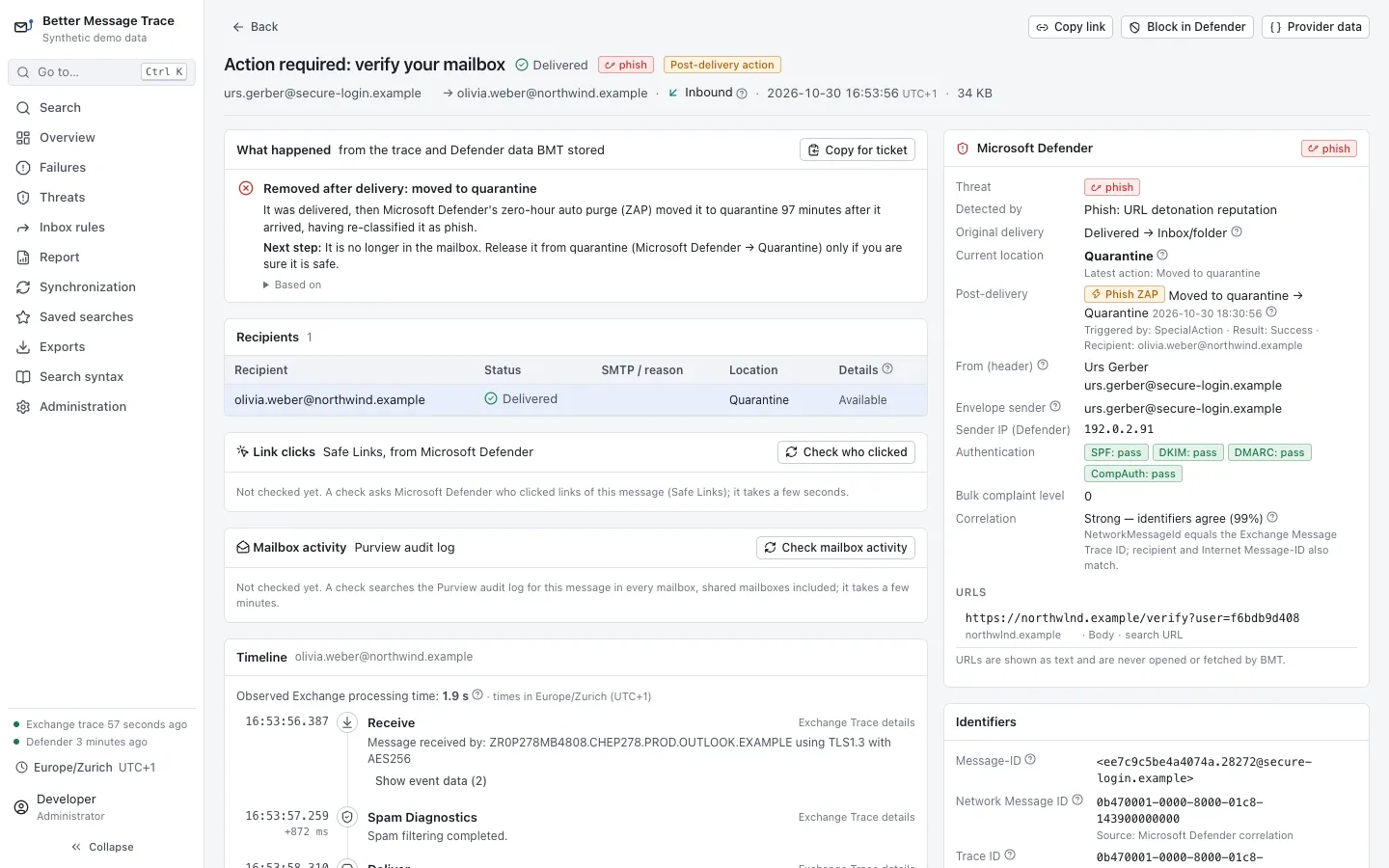
A phishing message, removed after delivery
At the top, what happened in plain words: delivered, then moved to quarantine by Defender’s ZAP 97 minutes after it arrived, with the next step for the help desk. Beside it, Defender’s verdict, the sender’s authentication and the message’s URL as text.
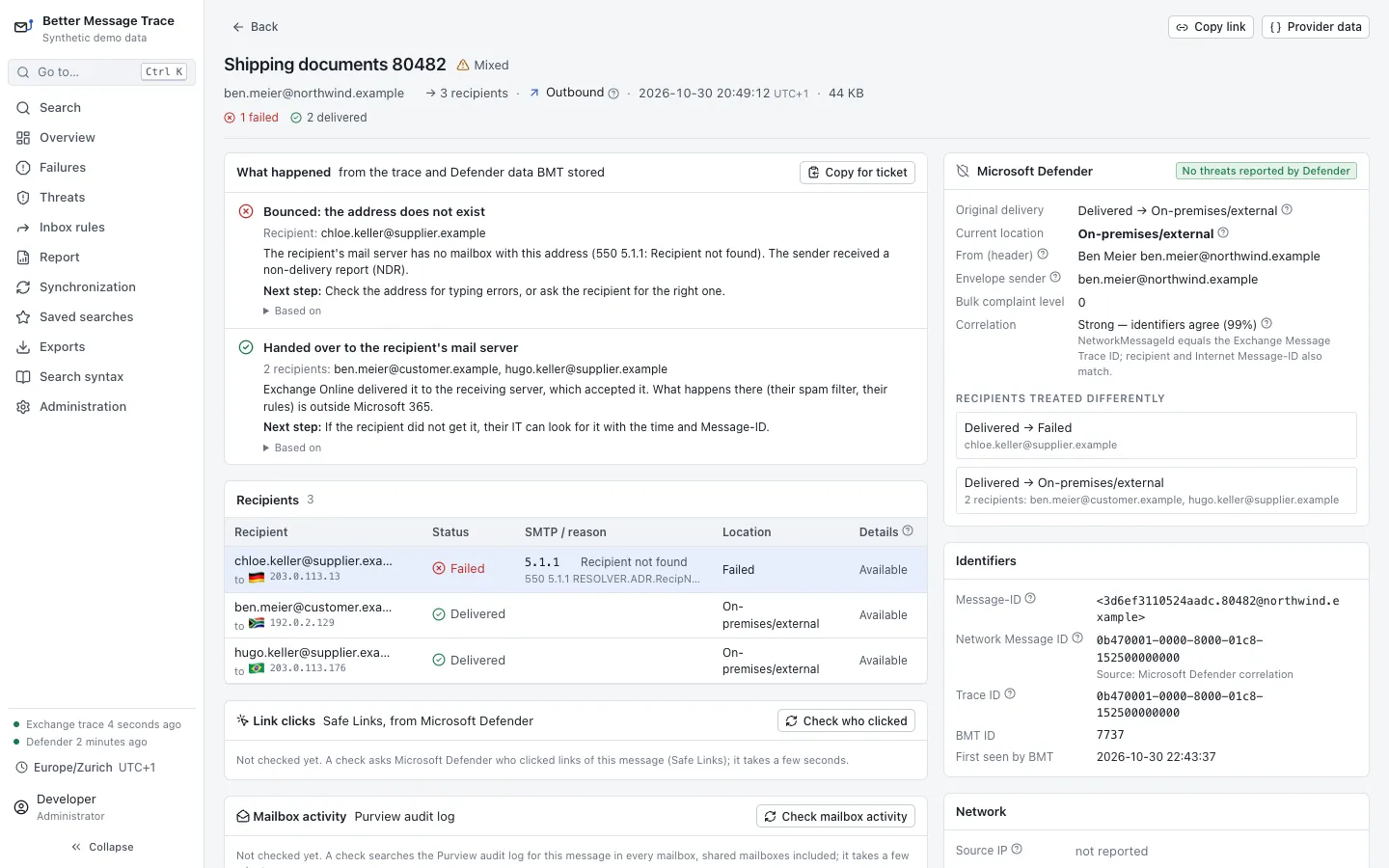
A bounce, explained
One of three recipients failed with 5.1.1: the address does not exist. The page says so in a sentence, groups the two recipients whose mail server accepted the message, and gives each outcome a next step, with a summary to copy into the ticket.
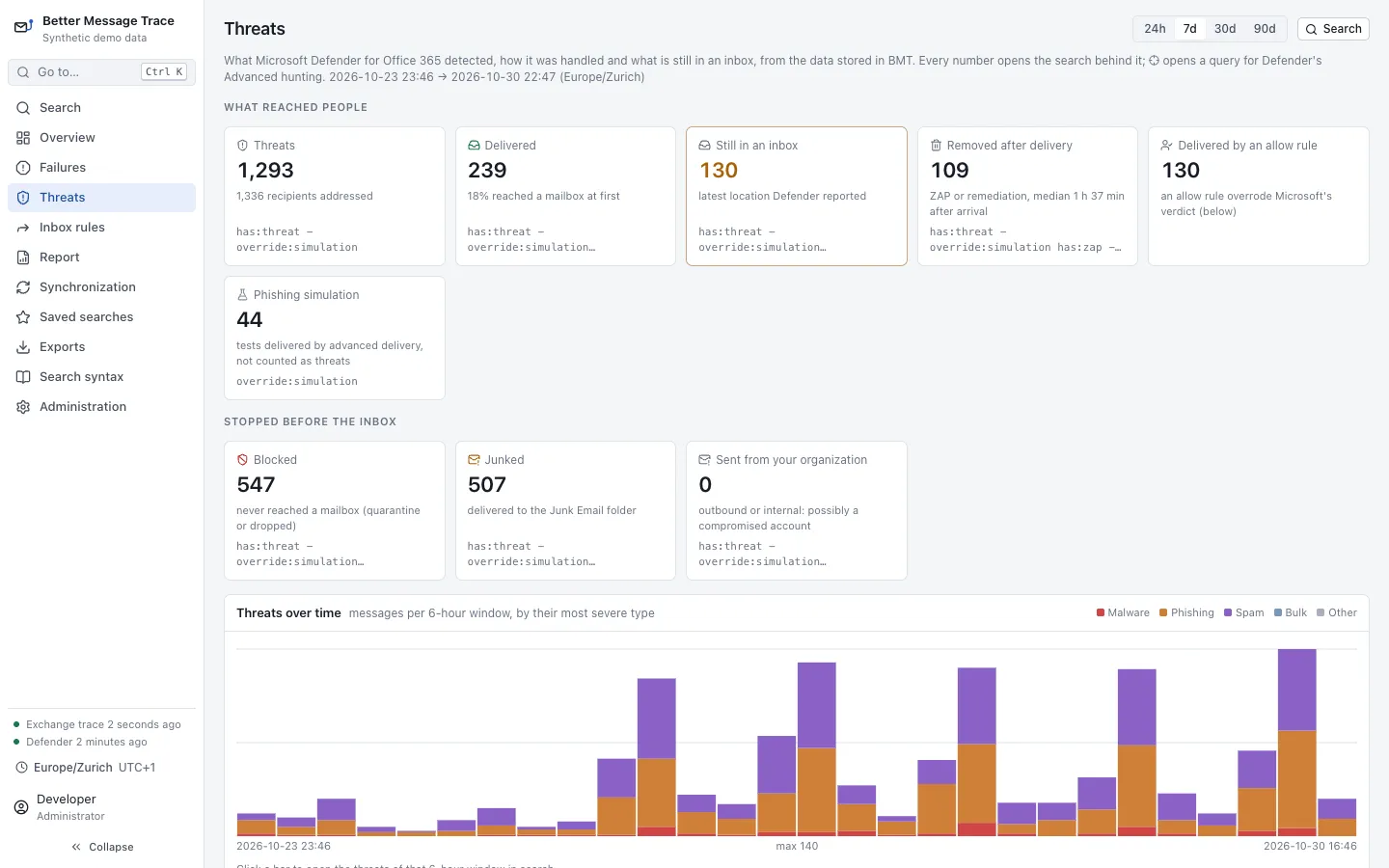
What Defender caught, and what got through
The threat overview for the last seven days: how many threats reached a mailbox, how many are still in an inbox, how many were removed after delivery and how soon, and how many an allow rule let through. Every number opens the search behind it.
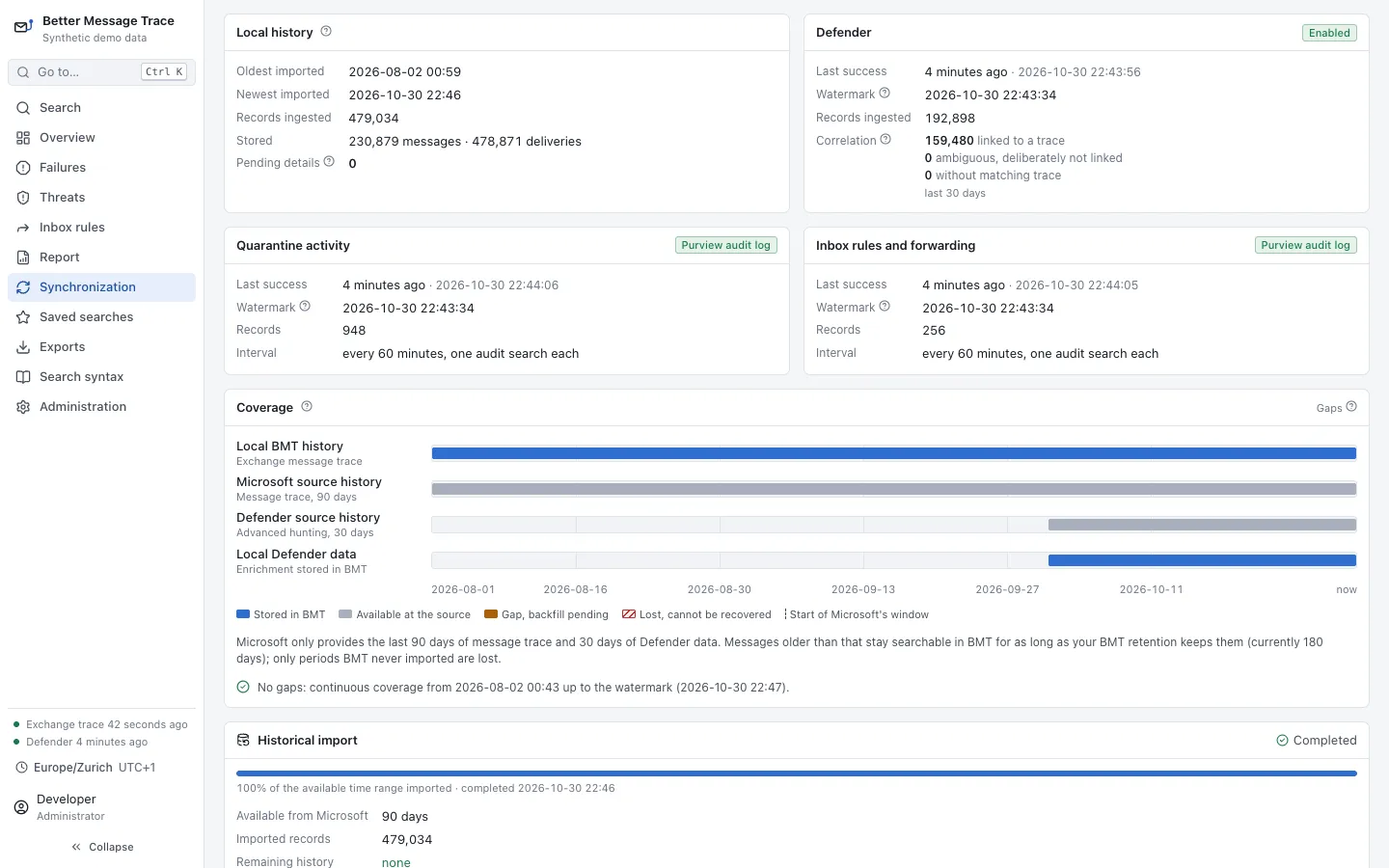
What has been imported
Coverage over time for message trace and Defender, set against what Microsoft still holds, and the imports from the audit log. A gap would show here, and is filled again while Microsoft still has the data.
Privacy and permissions
Metadata only, and only the permissions it needs.
Message trace is personal data: who wrote to whom, when, and about what. Better Message Trace keeps no more of it than it needs, shows the most personal parts to investigators only, and you decide how long it keeps any of it.
- A permission per feature
- ExchangeMessageTrace.Read.All to start. Defender, the audit log and the inbox rules each add their own read permission, and only if you turn them on. It never asks for Mail.Read.
- No content
- Addresses, subjects, times, status, mail servers’ IP addresses and sizes. No message bodies, no attachments, and it never opens a link.
- Nothing sent elsewhere
- Countries, network owners and sender reputation come from local files and your own data. The license is checked offline: Better Message Trace never contacts us and sends no usage data.
- Subjects and URLs your way
- Subjects in full, as a keyed hash or not at all; URLs in full, as host names only or not at all.
- Three roles
- Sign-in with Microsoft Entra ID as administrator, investigator or reader. Who clicked a link and who did what in a mailbox are for investigators only.
- Retention and an audit log
- How long each kind of data is kept is a setting. The audit log records sign-ins, denied access, and every change with its values before and after.
How you get it
On your servers or ours.
On your servers
One container image and a PostgreSQL database, from a deployment kit with each release, on your own servers or in your Azure. We set it up with you: the app registration in Entra ID, its certificate and the installation.
Run by us
An instance of its own for your tenant, in Switzerland or the EU, run and kept up to date by us.
Support
Help from the people who build it, when a message did not do what you expected or Microsoft’s data does not add up.
What it needs
- Microsoft 365
- Exchange Online
- Defender, optional
- Defender for Office 365 Plan 2 or Microsoft Defender XDR
- Audit features, optional
- Microsoft Purview Audit (Standard)
- On your servers
- Docker and PostgreSQL 16 or later
- Storage
- About 1–2 GB per million recipient records
- License
- A license file from us, for your tenant
Better Message Trace is in early access.
Its core is done and tested with synthetic data at millions of records. Microsoft’s message trace API in Microsoft Graph is new as well, so we set it up together with you and look at what your tenant shows. Write to us if you would like to try it.
Ask for early accessBetter Message Trace is an independent product by Dynavo. It is not affiliated with, endorsed by or sponsored by Microsoft. Microsoft, Microsoft 365, Exchange Online, Microsoft Entra and Microsoft Defender are trademarks of the Microsoft group of companies.